


Policies are available on Gateway plans, and are enabled per organization. If the page reports that Policies are not enabled, contact StackOne support.
How a policy is evaluated
A policy carries a single rule that allows or denies capabilities. Rules are made up of 4 parts:
Four guarantees hold across every policy:
A deny always wins
When policies overlap, a matching deny refuses the call whatever any allow says.
Policies narrow access
Connector Profile scoping and account access apply restrictions before policies.
Policies follow the member
Policies apply when the member is known, which is the case for AI platform sessions. A call made with a project API key is memberless — govern that traffic with Connector Profile scoping instead.
Policies stay in their project
A policy belongs to the project it is created in and governs calls made in that project only. To apply the same rule in several projects, create it in each.
Capabilities
A capability is the kind of access a rule governs: running a tool, reading or writing a field, or receiving PII in responses. Denying one removes that access for the users or groups the rule covers.
Rules can carry more than one capability. Capabilities are alternatives rather than conditions: the rule applies where any one of them matches, so adding a second says “or also” rather than narrowing the first. Each is scoped on its own terms, so one rule can deny a tool outright on one connector and only mask a field on another.
Create a policy
1
Open Policies
Select the project, open Project Settings > Policies, and click Create policy. Give the policy a descriptive name.
2
Pick the mode and status
Two settings control whether the policy acts:
- Status: Active policies are consulted from the project’s next call. Inactive policies are stored and never consulted.
- Enforcement: Monitor only records decisions without refusing anything. Enforce refuses the calls the policy denies.
3
Choose who it applies to
Select Everyone, Users, or Groups, then search for the users or groups the rule covers.
4
Choose what it does
Select Deny to refuse the capability for those users or groups, or Allow to state permitted use without restricting anything.
5
Set the capability and its targets
Add the capabilities the rule governs:
- Use a tool
- Read a field
- Write a field
- Redact PII
Denying Use a tool refuses the call.Choose which targets it applies under Applies to:
- Everything covers every tool in the project.
- A connector category covers every tool on every connector in the category, including connectors added later.
- A connector covers every tool on the connectors you pick.
- An account covers the tools of specific Linked Accounts. Search accounts by name or owner.
- Specific tools lets you pick a connector, then the tools on it by name.
Pattern syntax - wildcards
Pattern syntax - wildcards
*is the only wildcard, and it matches any run of characters.- A pattern has to cover the whole name:
salarymatches only something named exactly that, so use*salary*to match it anywhere. - Matching is case-sensitive.
?,[a-z], and{a,b}are ordinary characters here, not wildcards. A pattern using one saves cleanly and then never matches anything.
6
Add exemptions
For a deny rule, use Exempt from this rule to name users or groups the rule does not apply to. Another matching deny can still refuse the call.
7
Review and create
Review the policy:
-
Plain Text: the panel footer restates the rule in plain words, for example:
Everyone in this project may not use a tool matching
*delete*on Workday, except Finance (Group). - Cedar: the exact statement the engine will evaluate, in Cedar syntax. The view is read-only; change the form and the statement follows.
- JSON: the same statement in Cedar’s JSON encoding.
If you used the assistant, the button reads Accept changes and create. See Build a policy using chat.
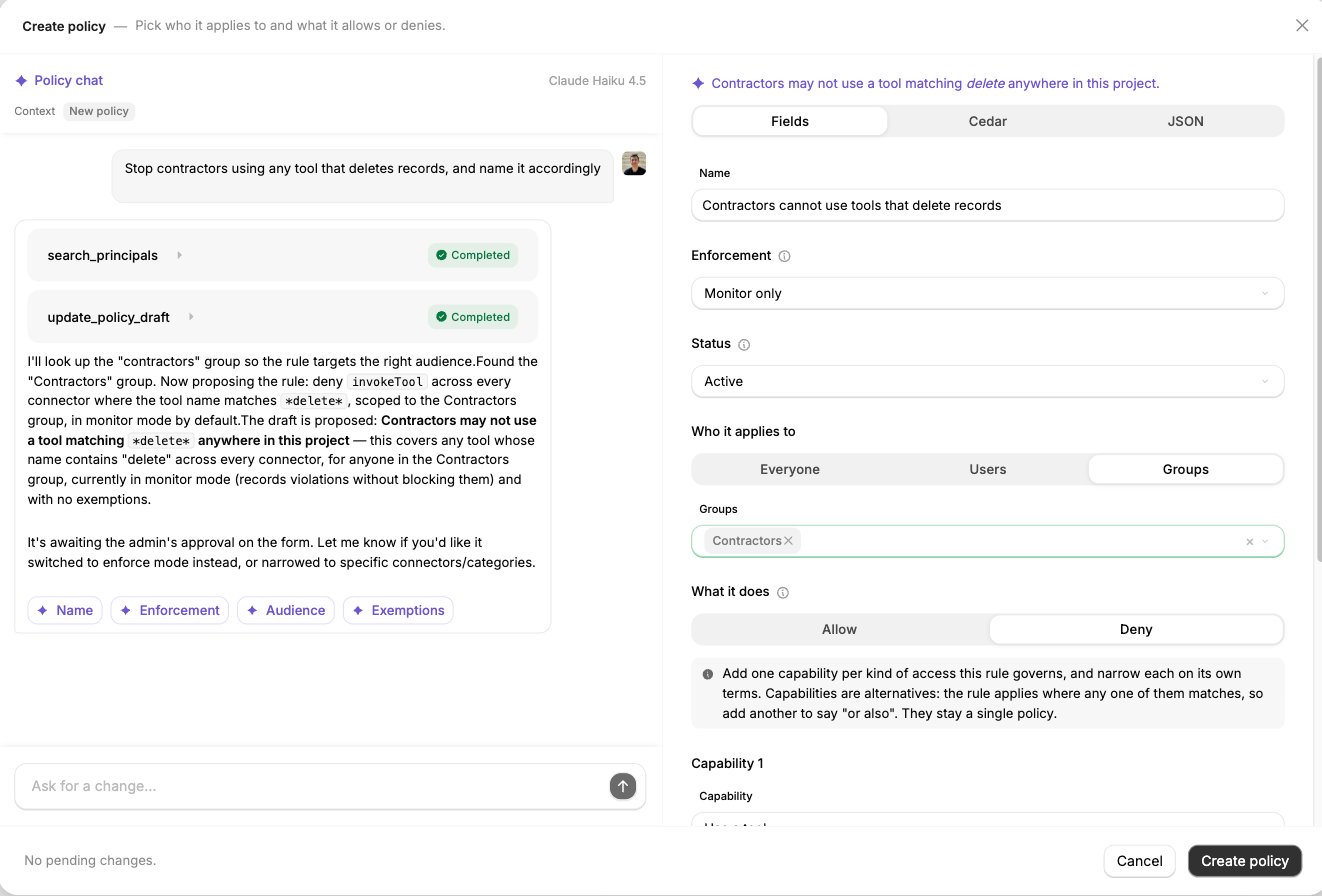
A deny rule on the Create policy panel, with Monitor only and Active selected and Fields / Cedar / JSON above the form.
Build a policy using chat
Policy chat is available on policy create and edit. Describe the rule you want in your own words and the form will be updated automatically, showing you the suggested changes:- Suggestions are highlighted in the form, with the previous value shown underneath.
- Each suggestion can be applied or reverted individually.
- All changes can be applied using the buttons at the top of the form or simply by clicking Accept changes and create/Accept changes and save.
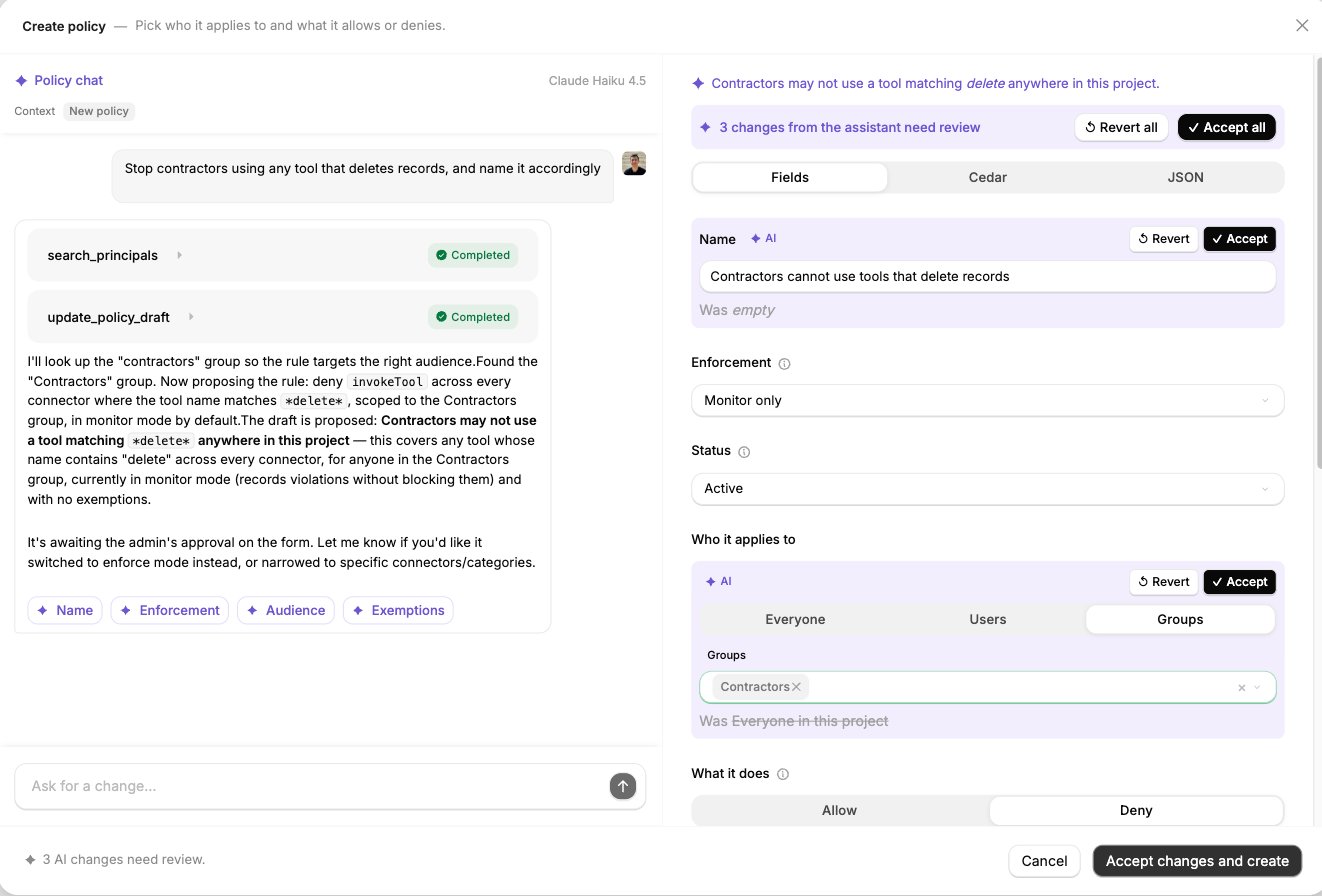
Policy chat beside the form. The assistant looked up the Contractors group, proposed a deny rule, and left three changes marked for review.
What policy chat can access
Policy chat can look things up in the project as it drafts, and the transcript shows each lookup as it runs:By default, only a tool call’s tool, connector and caller are exposed.With advanced logging enabled, the assistant can read the request/response payloads to help define field related capabilities.
Stop contractors deleting records
- The assistant searches existing groups, sets Who it applies to to
Groupsand populates withContractors. - Writes a deny on Use a tool with a
*delete*pattern, with applies to set toEverything.
delete does not catch a connector that uses tool names using remove or archive. So you can confirm and ask it to also apply these patterns.
Starting from logs
Policy creation can be initiated from a specific log instead of the policies page.1
Go to StackOne Logs.
2
Select the log of a call you want to create a policy from.
3
Click Use in policy at the top of the panel.This takes you to the Policies page with the context of the log selected.
4
Either select an existing policy OR create a new policy by clicking Create policy.
5
The Policy chat now has the context of the log selected.Continue by using the policy chat to craft the policy. For example:
This call should not have been allowed to return salary
This person should not have been allowed to make itSee Build a policy using chat.
Testing a policy before enforcing it
Two checks come before enforcing:- Test against personas: in the create and edit panel, Test this policy against personas shows what the rule would decide for the members you choose, without making a call.
- Monitor only: set the policy’s Enforcement to Monitor only and applicable tool calls are flagged as calls the policy would have applied to, while continuing unaffected.
Duplicating policies
Instead of starting with a blank new policy, an existing policy can be used as a template.1
On an existing policy’s row in the Policies table, click the … button. Then click Duplicate.
2
A new policy is drafted with the original policy’s details except:
- Name: original name is appended with
(copy). - Enforcement: set to Monitor only.
- Status: set to Inactive.
3
Edit as needed then click Create policy when done.
What a denied call returns
When an enforced policy refuses a tool call, the request fails with HTTP403 before anything reaches the underlying provider. The refusal returns to the agent as the tool result.
Troubleshooting
Why is a pattern matching the wrong tools, or none at all?
Why is a pattern matching the wrong tools, or none at all?
- It matches nothing. The pattern has to cover the whole name:
salaryonly matches a tool named exactly that, so use*salary*.?,[a-z], and{a,b}do not perform any special matching. - It misses tools you expected. Matching is case-sensitive:
*Delete*missesworkday_delete_worker. A pattern matches exactly rather than describing a behaviour:*delete*does not catch a tool namedworkday_remove_worker. - It matches more than you expected.
*matches any run of characters, underscores included, so*create*could coverlist_created_employees.
Why is a policy not taking effect?
Why is a policy not taking effect?
Check the following in order:
- The policy is Active.
- Its mode is Enforce.
- The acting member is in its audience (and not exempt).
- The call is made in the project the policy was created in.
- The tool name or pattern matches exactly, including case.
- The caller is a member connected through an AI platform, so the call carries their identity. A call made with a project API key alone names no member, so no policy governs it.
Can I see policy decisions in request logs?
Can I see policy decisions in request logs?
Yes, on an action log. Open the record and select the Policy tab.
Next steps
Scoping Connectors
Set which actions each Connector Profile exposes.
Groups
Maintain the groups your policies apply to.
Connector Profile Access
Control who can link accounts on a profile.
Observability
Configure request logging and retention.