> ## Documentation Index
> Fetch the complete documentation index at: https://docs.stackone.com/llms.txt
> Use this file to discover all available pages before exploring further.
# Observability
> Track activity and control how long request data is kept.
StackOne records activity at two levels: security logs at the organization level and request logs at the project level. Together they cover who signed in and what calls your project made.
## What's logged
| Log | Level | Covers |
| - | - | - |
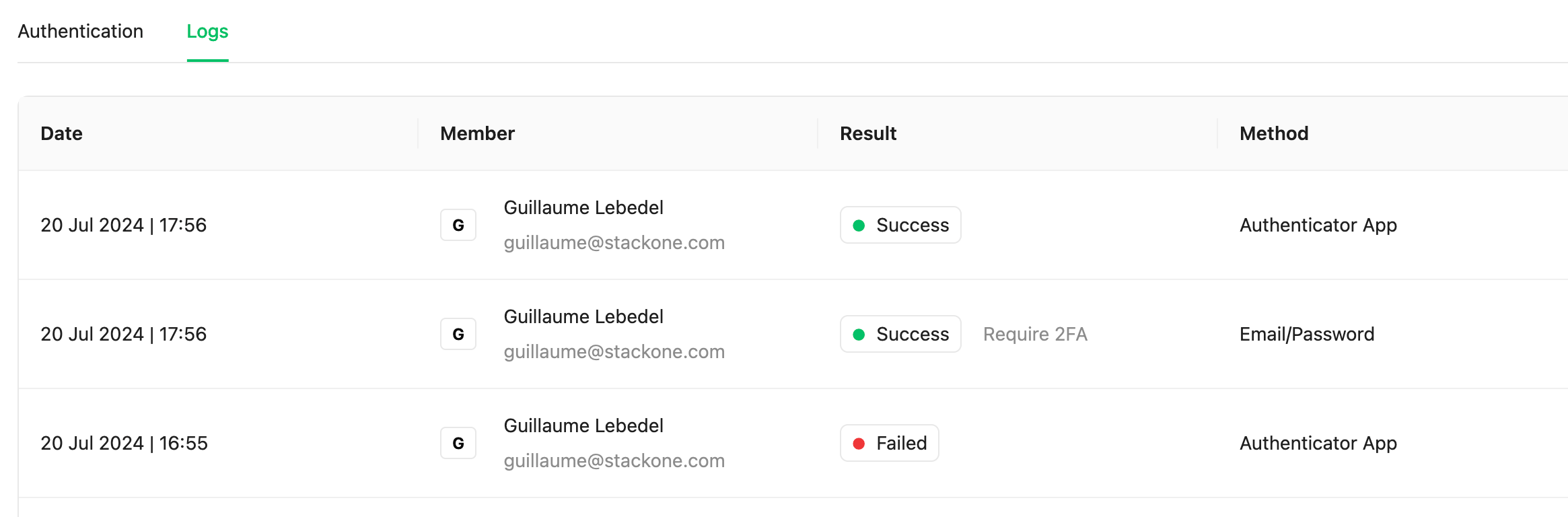
| Security logs | Organization | Every login attempt, success or failure. |
| Request logs | Project | API and webhook requests, with status and payload detail for debugging. See [Request Logs](/connect/troubleshooting). |
## Security logs
Security logs are a record of every login attempt, success or failure, for monitoring and audit. Open them under [**Organization > Security > Logs**](https://app.stackone.com/organization/security/logs).
 ## Advanced Logs
Advanced Logs stores the request and response bodies of your project's calls, so you can debug a failed request step by step. See [Request Logs](/features/observability/request-log-debugging#advanced-logs-request-and-response-bodies) for how to read them.
Open **Project Settings → Advanced Logs** to configure it. Settings apply to the whole project.
Advanced Logs is **off by default**. Turn it on before detailed request logging starts.
## Advanced Logs
Advanced Logs stores the request and response bodies of your project's calls, so you can debug a failed request step by step. See [Request Logs](/features/observability/request-log-debugging#advanced-logs-request-and-response-bodies) for how to read them.
Open **Project Settings → Advanced Logs** to configure it. Settings apply to the whole project.
Advanced Logs is **off by default**. Turn it on before detailed request logging starts.
 ### Settings
| Setting | Description | Default |
| - | - | - |
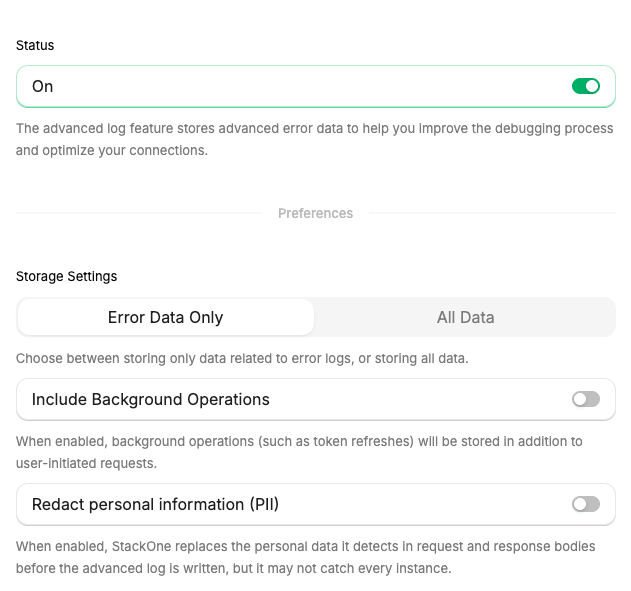
| **Status** | Turns Advanced Logs on or off for the project. | Off |
| **Storage Settings** | **Error Data Only** stores bodies only for failed requests (HTTP status 400 or above). **All Data** stores them for every request. | Error Data Only |
| **Include Background Operations** | Also stores operations StackOne runs itself, such as token refreshes, alongside the requests your users make. | Off |
| **Redact personal information (PII)** | Replaces personal data in stored bodies. See [PII redaction](#pii-redaction). | Off |
| **Storage Duration** | How long logs are kept before they are deleted: 1, 7, or 30 days. | 30 days |
| **Automatically Disable on Date** | Turns Advanced Logs off on the date you pick, so logging you turned on to debug an issue does not keep running. | None |
The other settings can only be changed while **Status** is on.
### Settings
| Setting | Description | Default |
| - | - | - |
| **Status** | Turns Advanced Logs on or off for the project. | Off |
| **Storage Settings** | **Error Data Only** stores bodies only for failed requests (HTTP status 400 or above). **All Data** stores them for every request. | Error Data Only |
| **Include Background Operations** | Also stores operations StackOne runs itself, such as token refreshes, alongside the requests your users make. | Off |
| **Redact personal information (PII)** | Replaces personal data in stored bodies. See [PII redaction](#pii-redaction). | Off |
| **Storage Duration** | How long logs are kept before they are deleted: 1, 7, or 30 days. | 30 days |
| **Automatically Disable on Date** | Turns Advanced Logs off on the date you pick, so logging you turned on to debug an issue does not keep running. | None |
The other settings can only be changed while **Status** is on.
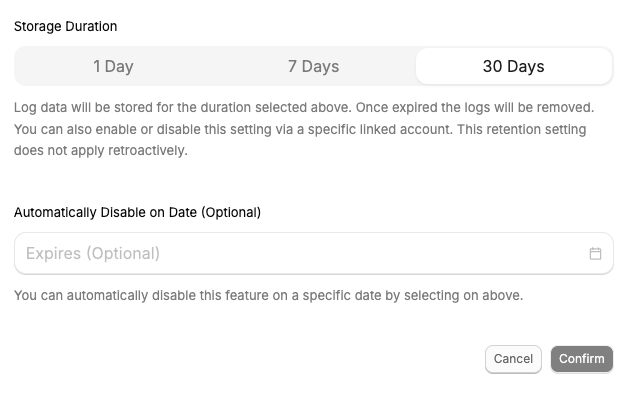 Retention changes apply only to new logs. Existing logs keep the retention they were stored with.
### PII redaction
PII redaction removes personally identifiable information (PII) from stored bodies. When **Redact personal information (PII)** is on, StackOne scans each body before the log is written and replaces the personal data it detects with `[REDACTED]`. Only the redacted copy is stored.
* **Detection.** Patterns catch email addresses and credential-like tokens. A model finds names, phone numbers, postal addresses, government ID numbers, payment card numbers, and other personal data.
* **Scope.** Request and response bodies only. Log metadata such as the path, status code, connector, and Linked Account stays intact, so logs remain searchable.
* **Applies to new logs only.** Logs that are already stored are not changed.
* **Credentials.** Fields whose names match a fixed list of credential names, such as `password`, `token`, `api_key`, `client_secret`, and `authorization`, are masked in every stored body whether or not PII redaction is on. The value is replaced with `**redacted**`, followed by its last five characters when it is longer than 10 characters.
StackOne may not catch every instance of personal data. Don't treat redaction as the only control for regulated data.
For compliance requirements beyond these settings, contact your StackOne account manager.
This documentation is built and hosted on [Mintlify](https://mintlify.com), a developer documentation platform.
Retention changes apply only to new logs. Existing logs keep the retention they were stored with.
### PII redaction
PII redaction removes personally identifiable information (PII) from stored bodies. When **Redact personal information (PII)** is on, StackOne scans each body before the log is written and replaces the personal data it detects with `[REDACTED]`. Only the redacted copy is stored.
* **Detection.** Patterns catch email addresses and credential-like tokens. A model finds names, phone numbers, postal addresses, government ID numbers, payment card numbers, and other personal data.
* **Scope.** Request and response bodies only. Log metadata such as the path, status code, connector, and Linked Account stays intact, so logs remain searchable.
* **Applies to new logs only.** Logs that are already stored are not changed.
* **Credentials.** Fields whose names match a fixed list of credential names, such as `password`, `token`, `api_key`, `client_secret`, and `authorization`, are masked in every stored body whether or not PII redaction is on. The value is replaced with `**redacted**`, followed by its last five characters when it is longer than 10 characters.
StackOne may not catch every instance of personal data. Don't treat redaction as the only control for regulated data.
For compliance requirements beyond these settings, contact your StackOne account manager.
This documentation is built and hosted on [Mintlify](https://mintlify.com), a developer documentation platform.